

This series invites you behind the scenes of EXTRA WALLET, unveiling the architecture and smart technologies that simplify and secure your daily crypto activities.
In this text, we’ll talk about WalletConnect, the connectivity layer that enables secure dApp interactions within EXTRA WALLET. It lets you connect to decentralized applications without exposing your private keys.
An integration of this type is a must-have for crypto platforms, since in the modern Web3 ecosystem, a wallet without dApp connectivity is isolated from the market.
It gives access to tens of thousands of dApps through a single module, allowing interaction with DeFi, NFTs, DAOs, and other Web3 services. Private keys stay on your device; each action requires confirmation, and dApp interactions work across multiple blockchain networks without extra setup.
In EXTRA WALLET, WalletConnect integration is available in the Apps section as an extension. You can activate it whenever you need access to the dApp ecosystem.
What Is WalletConnect?
WalletConnect is an open-source communication protocol between a crypto wallet and a decentralized application (dApp). It establishes an encrypted channel between two parties: the wallet and the dApp.
In the context of integration into a crypto platform or crypto wallet, the Wallet SDK (WalletKit) plays a key role, serving as a universal connection layer that enables a wallet to securely connect to Web3 services.
WalletConnect solves a number of user tasks:
Allows a wallet to securely connect to any dApp, such as DEXs, NFT marketplaces, DeFi protocols, and Web3 games, without sharing private keys.
Creates an encrypted communication channel (end-to-end encryption) between the wallet and the application for signing transactions, messages, and authentication. Supports multi-chain sessions.
Manages sessions and permissions: the user controls which dApps are connected and can disconnect any session at any time.
WalletConnect is usually integrated by wallet providers, dApp developers, institutional platforms, and payment services. Today, the WalletConnect Network serves more than 54 million unique active wallets.
How It Works in EXTRA WALLET
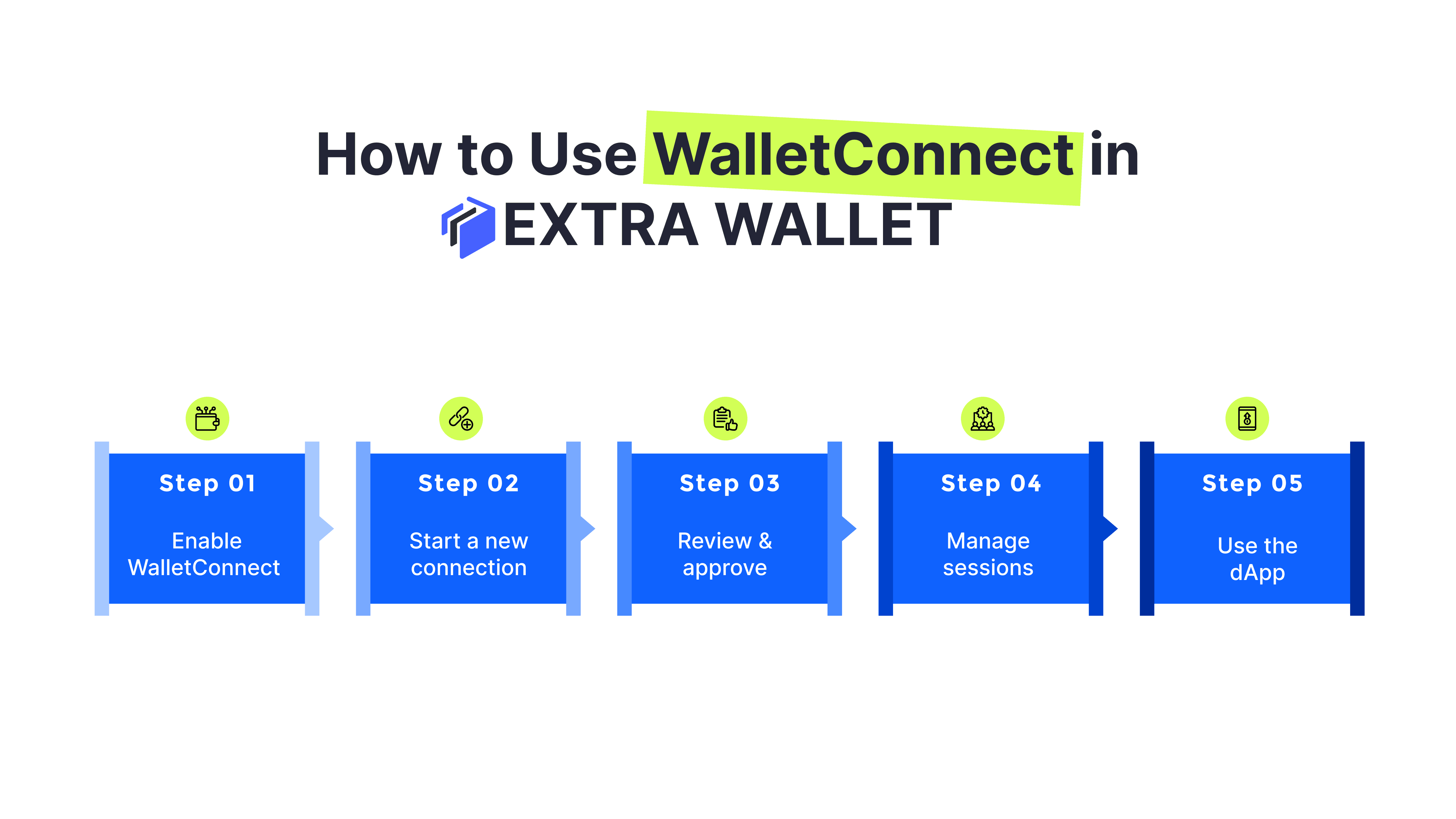
Activate WalletConnect in the Apps section by switching the toggle on. The extension then appears on the main screen in the top right corner.
From there, everything is simple.
1.
First, on the dApp side, you click Connect Wallet, choose WalletConnect, and receive a QR code or pairing link.
2.
In the wallet, click the WalletConnect icon, create a New Connection, select the wallet and account, then scan the QR code or paste the pairing code. Click Connect.
3.
After that, a confirmation window will appear with the dApp’s name and a link to the website. Verify the origin and click Approve to establish the session.
4.
You can then use the dApp as usual: select tokens, initiate a swap, or take other actions. Each transaction opens a Sign Transaction modal window, where you confirm the operation.
5.
You can manage sessions at any time. Click the WalletConnect icon, review the connected dApps, and click Disconnect to revoke access. Add new connections whenever needed.
Privacy & Security Overview
WalletConnect within EXTRA WALLET does not create additional risks for your keys.
Private keys and mnemonics never leave the wallet. When connecting, an encrypted session is established. Only encrypted JSON-RPC messages, such as transaction or signature requests and their results, are transmitted through the relay. Relay servers route the packets but cannot read their contents.
Every action requires explicit confirmation. There is no auto-sign: transactions and signatures always go through manual approval in the wallet. A dApp will perform an operation only with your consent.
We display the dApp’s name and URL during connection so you can verify the origin and avoid phishing. Sessions are stored locally in your browser or profile.
WalletConnect operates as a secure communication channel between the wallet and the dApp. The keys remain only with you, and only the signature result is transmitted, not the key itself.
User Cases
When WalletConnect Matters?
1. DeFi operations (swap, lending, staking)
You want to swap, provide liquidity, or stake tokens through a dApp. WalletConnect creates an encrypted session between your wallet and the protocol. You see the transaction details and confirm manually. The keys stay in the wallet.
2. NFT, Web3 marketplaces, and games
You connect to a marketplace or game to mint or make a purchase. You scan a QR code or open a deep link, confirm the session, and sign the transaction in the wallet. One wallet for all Web3 scenarios.
3. Crypto payments
You pay for a product or service through a Web3 interface. You receive a payment request in the wallet, review the details, and confirm the transaction. You do not share keys or lose control over your assets.
Key Takeaways
WalletConnect is today’s standard for connecting wallets to dApps. Without this module, a wallet is cut off from the Web3 ecosystem, including DeFi, NFTs, gaming, DAOs, and other services.
Support for 150+ blockchains means a single integration gives access to multi-chain Web3 without extra setup. With EXTRA WALLET's modular architecture, you choose when to activate this tool.
Join the EXTRA WALLET Closed Beta
Be part of shaping the next standard in crypto.
Request to Join the BetaEXTRA WALLET is now in closed beta testing. The architecture is stable, and further improvements will be based on real-world use and feedback. Try the platform, test advanced workflows, and help improve the next standard for secure crypto platforms.